


See why our customers love PCB Artist - the best online PCB design software!
"I am so thrilled that my prototype boards were inexpensive, they came back working the first time, and I didn't have to fuss with figuring out how to get all the right design files together in the right format. For my next prototype, I'm going to start in PCB Artist first."
DOWNLOADS.CNET.COM USER REVIEWOnline PCB Design Made Easy
Professional-Grade Online PCB Design Software with Free Live Technical Support. PCB Artist Includes Features Such as Multi-Page Schematics and Netlist Import.
Advanced Circuits' online PCB design software is not only easy to use, it is absolutely the best free PCB layout software available! Our customers tell us one of the reasons they love doing business with us is because of our PCB design software. When it comes to designing printed circuit boards, we help you get it done right, and that saves you time and money down the line.
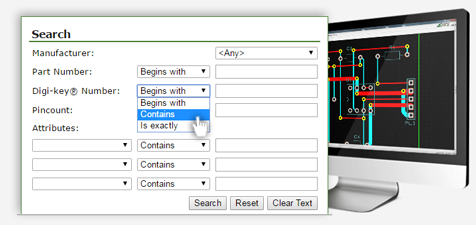
Components Library of Over 500,000 Parts
Search PCB Artist® Library »
View Sample Component »You will notice that on this page (in addition to all of these circuit board design tips and tools) we offer tutorials for our software, to make its use even easier and more valuable for you.
Video Tutorials | Download User's Guide | Tips & Tools
Live Tech Support (8:00am - 5:30pm MST) Call 1-800-979-4722 x.1025 or email Layouthelp@4pcb.com
PCB Artist® vs Other CAD Software
Compare PCB Artist® to the competition for printed circuit board design software
PCB Artist® |
A |
B |
C |
D |
E |
|
| Unlimited Software Version | FREE | Free | Free | Free | $1,200 | $7,000 |
| Gerber Format Files FREE 1 |  |
No | No | No | ||
| Integrated Schematics/PCB 2 | |
No | No | No | No | No |
| Symbol/Footprint/Part Creation wizard | |
No | No | No | No | No |
| Components/BOM/Positions CSV Export | |
No | No | No | No | No |
| Design Rule Check & Report | |
No | No | No | No | No |
| Component Autoplace | |
No | No | No | No | Yes |
| Context Sensitive Help Files (F1 key) | |
No | No | No | Yes | Yes |
| Individual Colored Nets Options | |
No | No | No | Yes | Yes |
| Ratsnest Connections Optimization | |
No | No | No | Yes | Yes |
| Design Status Reports | |
No | No | Yes | Yes | Yes |
| Moved Component Tracks Stay Connected | |
No | Yes | Yes | Yes | Yes |
| Powerplanes/Copper Pours | |
No | Yes | Yes | Yes | Yes |
| Modify Nets Commands/Reports | |
Yes | No | No | Yes | Yes |
| Integrity Check & Cross Probe | |
Yes | No | No | Yes | Yes |
| Controlled AutoRoute | |
Yes | No | Yes | Yes | Yes |
| Adjustable Design Rule Check/Navigation | |
Yes | No | Yes | Yes | Yes |
| Library Manager | |
Yes | Yes | No | Yes | Yes |
System Requirements:
PCB Artist® runs on Windows 7 through Windows 10 operatings systems. Linux and MAC OS are not currently supported, though users have had success using emulators. A Pentium processor faster than 1.8Ghz and with at least 512mb of RAM is recommended. PCB Artist® does not require particularly 'high-powered' hardware to achieve good performance, a regular off-the-shelf PC is sufficient. A complete product installation requires at least 1.26GB of hard drive space. Internet access is recommended. A wheel mouse is suggested. Click Here for PCB History.
PCB Artist® runs on Windows 7 through Windows 10 operatings systems. Linux and MAC OS are not currently supported, though users have had success using emulators. A Pentium processor faster than 1.8Ghz and with at least 512mb of RAM is recommended. PCB Artist® does not require particularly 'high-powered' hardware to achieve good performance, a regular off-the-shelf PC is sufficient. A complete product installation requires at least 1.26GB of hard drive space. Internet access is recommended. A wheel mouse is suggested. Click Here for PCB History.
Click Here for Detailed Software Revision History of PCB Artist®
1 After 1st order for each part number.

